GoHighLevel Reporting: How GHL Data Gets Into a Client Report
How leads, cost per lead and ROAS from GoHighLevel reach a client report, step by step. Read-only, so GHL stays your CRM. See a sample report.
On this page
- What GoHighLevel's own reports cover, and where client reporting gets hard
- The three numbers a client asks for: leads, cost per lead and ROAS
- How GoHighLevel data reaches a client report, step by step
- What Marketing Monster reads from GoHighLevel, and what it never does
- A sample client report
- What GoHighLevel-based ROAS leaves out
- Lead-flow check: catch a broken Meta-to-GoHighLevel hand-off
- Which setup fits: GoHighLevel alone, spreadsheets, or a reporting layer
- Plans
- Questions about GoHighLevel reporting
- Send clients one report, not three exports
GoHighLevel reporting (the platform is also called HighLevel, or GHL) answers one question well: what is happening inside your account. Your clients ask a bigger one: what did my ad spend turn into? Marketing Monster reads your GoHighLevel data and puts it next to Meta Ads, Google Ads, GA4 and SEO in one client report.
It is read-only. It never changes anything in GoHighLevel, and it does not create, edit or pause ads. GoHighLevel stays your CRM.
Join the early access list. Early testers get in first.
Built for agencies that run client ad accounts and use GoHighLevel for leads and deals.
Last verified: November 10, 2026 (GoHighLevel facts below are from HighLevel's own help pages).
What GoHighLevel's own reports cover, and where client reporting gets hard
GoHighLevel has real reporting built in. HighLevel's changelog says dashboards and custom reports are available on all plans. Its help article on creating and scheduling reports describes a builder where you choose widgets, set a frequency, a time and recipients, and send the result as a PDF by email. Recipients of custom reports do not need a HighLevel login. Plan details change, so check HighLevel's current plan page rather than relying on a third-party summary.
The same help article is honest about the limits. They matter once you are sending reports to paying clients:
- An emailed report is a snapshot. It shows the numbers at the moment it was sent.
- Table widgets show only the first 100 records in the PDF and email preview.
- Timezones can differ. The report builder, the email preview and ad-platform data can each use a different one, so a day's numbers may not line up across them.
None of that is a flaw: it is a CRM reporting tool doing what it should. The gap shows up when a client wants spend, leads, deals and revenue on one page, plus GA4 and SEO, which is why agency owners ask in forums how others handle monthly client reporting and why plenty of agency sites sell custom dashboard builds.
When GoHighLevel's reports are enough
Stay with GoHighLevel's own reports if:
- you report on one client, or a few, and the numbers are mostly CRM numbers (contacts, pipeline, appointments);
- the audience is your own team, or a client who is happy with an emailed GoHighLevel snapshot;
- you do not need ad spend, GA4 or SEO in the same document.
A reporting layer starts to help when you report across several channels, for several clients, and want the same layout every time without rebuilding it by hand.
The three numbers a client asks for: leads, cost per lead and ROAS
Clients ask for three things. Where each one comes from is not obvious, so here it is plainly.
| Number | Where it comes from | What it needs |
|---|---|---|
| Leads | Your ad platforms report them (leads on Meta, conversions on Google Ads). GoHighLevel adds leads by source | A connected ad account, and GoHighLevel connected for the by-source view |
| Cost per lead | Ad spend divided by the leads Meta reports, or by the conversions Google Ads reports | A connected ad account. GoHighLevel is not used for this number |
| ROAS | Won revenue from deals that came from Meta sources, divided by Meta spend | GoHighLevel connected, Meta spend, and Meta-sourced deals to match |
Here is the arithmetic, with made-up numbers. These are example figures, not results:
- Example: $1,000 of Meta spend and 40 leads reported by Meta gives a cost per lead of $25.
- Example: $3,000 in won deals from Meta sources, divided by the same $1,000, gives a ROAS of 3.0x.
Note what GoHighLevel does and does not do here. Cost per lead comes from your ad platforms. GoHighLevel adds what happened to those leads next: which became won deals, from which source, and for how much.
How GoHighLevel data reaches a client report, step by step
This is the path from a lead in GoHighLevel to a number in your client's report. Each step says what can go wrong, because that is where reports quietly break.
-
It reads your data, read-only. It reads the opportunity and contact data it needs to show where leads came from, which deals were won and what they were worth, and to check that new leads arrive. What can go wrong: an opportunity with no source recorded lands in an "Unknown" row. Very large accounts are summarized: if a location is too big to load in full, the report says its figures may be incomplete.
-
It groups leads by source. For each source the report shows leads, converted deals and won revenue. A deal is converted when it is marked won, or when it sits in a pipeline stage you have named with the word Won (for example "Business Won"). It counts in the period it was won, even if the lead arrived earlier. What can go wrong: name your winning pipeline stage with the word Won, or mark the deal won. A stage called "Closed" or "Paid" is not counted.
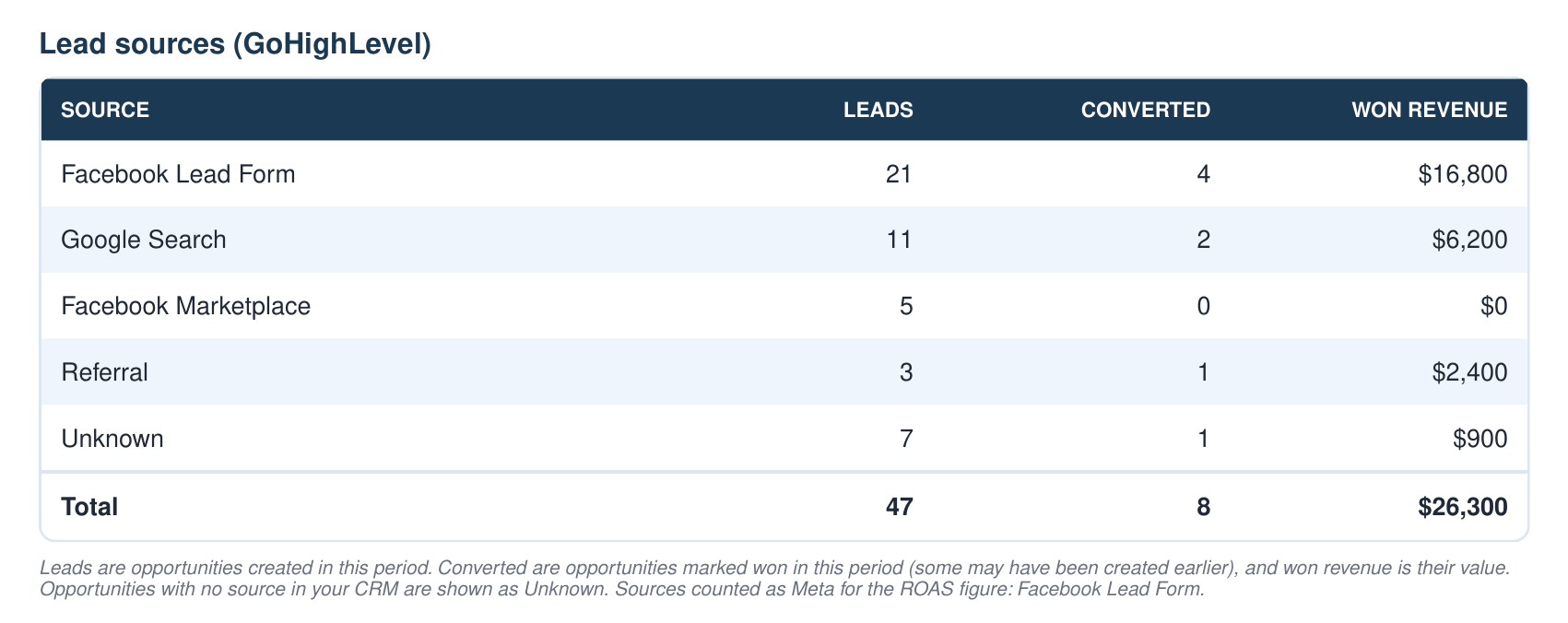
Sample data, not a real client. -
It divides by Meta spend to get ROAS. That is won revenue from Meta sources, divided by what you spent on Meta in the period. Only sources that identify Meta ads count. Organic and marketplace traffic does not, so name your Meta lead source so it says Facebook, Instagram or Meta. A footnote on the card explains the rule, and the table footnote lists the sources counted. What can go wrong: ROAS appears when the report has both Meta spend and Meta-sourced deals to match. A deal won this month from a lead created last month is counted against this month's spend, so single months can be noisy.

Sample data, not a real client. -
The lead-flow check compares Meta leads with new GoHighLevel contacts. It runs daily. If Meta reports leads and GoHighLevel shows none, it raises a "possible interruption". It covers Meta only. What can go wrong: it is a flag, not proof. It stays quiet when there is too little data to judge. It does not verify individual leads, and contacts can come from any source.
-
The GoHighLevel section lands in the client report PDF, next to Meta Ads, Google Ads, GA4 and SEO. The PDF is attached to the monthly client email, and you can generate it on demand for a period you choose. If a client has not connected GoHighLevel, their report does not mention it at all. What can go wrong: a disconnected channel's section is missing rather than showing zeros. Check the connections before you send.
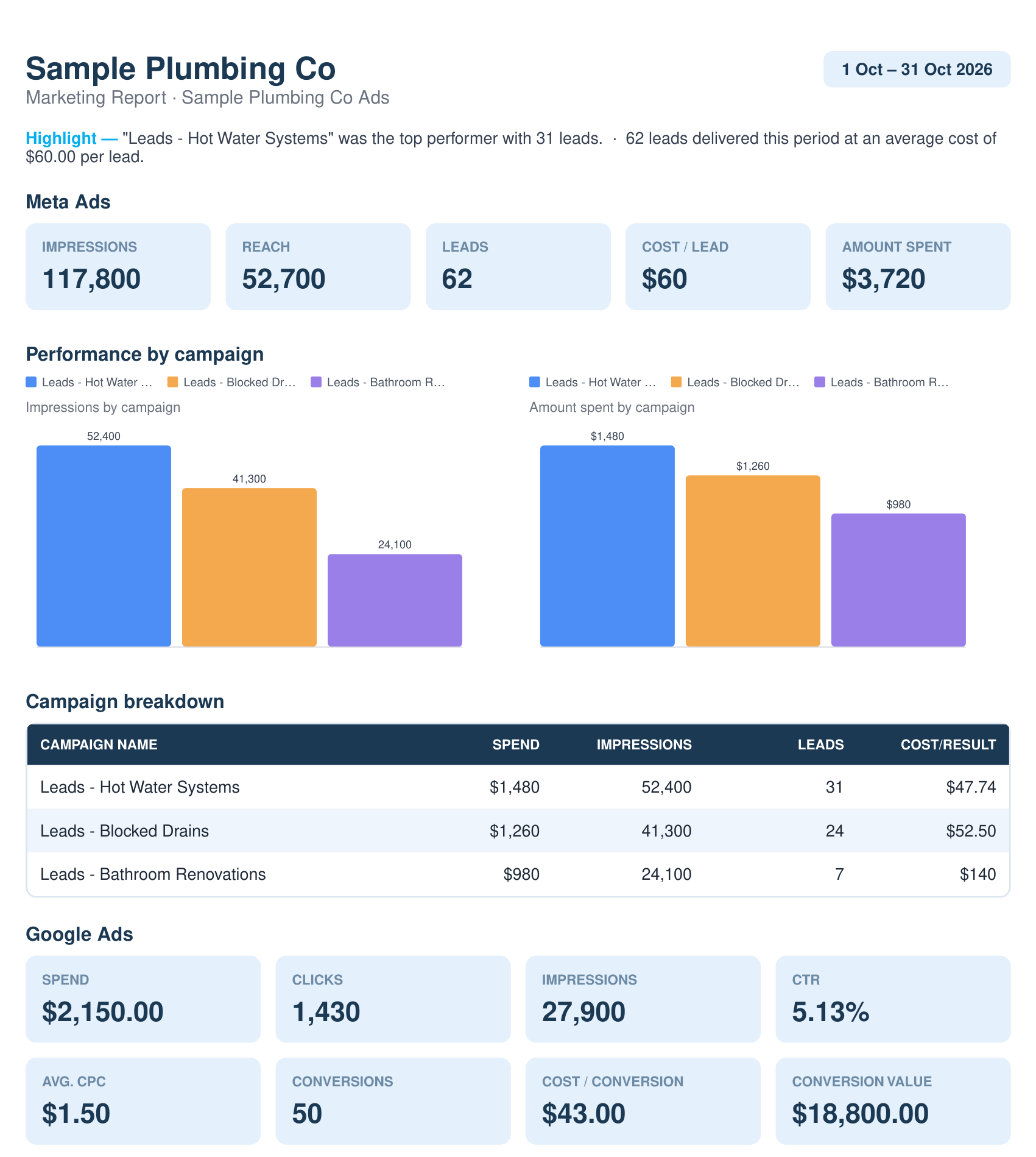
Sample data, not a real client.
How often does it update? Lead-flow checks run daily. GoHighLevel figures in a report reflect your CRM at the moment the report is built, so a deal marked won afterward appears in the next report.
Join the early access list. Early testers get in first.
What Marketing Monster reads from GoHighLevel, and what it never does
You are handing over access to a client's CRM, so the boundary should be easy to read.
| It reads | It never |
|---|---|
| Where your leads came from and which became won deals | Creates, edits or deletes contacts, opportunities or deals |
| The value of won deals | Sends messages or emails to your contacts |
| Whether new contacts are arriving | Changes your workflows, pipelines or settings |
| Creates, edits or pauses ads in Meta or Google |
Marketing Monster is not a CRM and not a pipeline tool. It only reads from GoHighLevel, for reporting and alerts.
A sample client report
Here is what the output looks like: a client report with a "From your CRM (GoHighLevel)" block and a lead sources table beside the ad numbers. All numbers and names are sample data, not a real client.
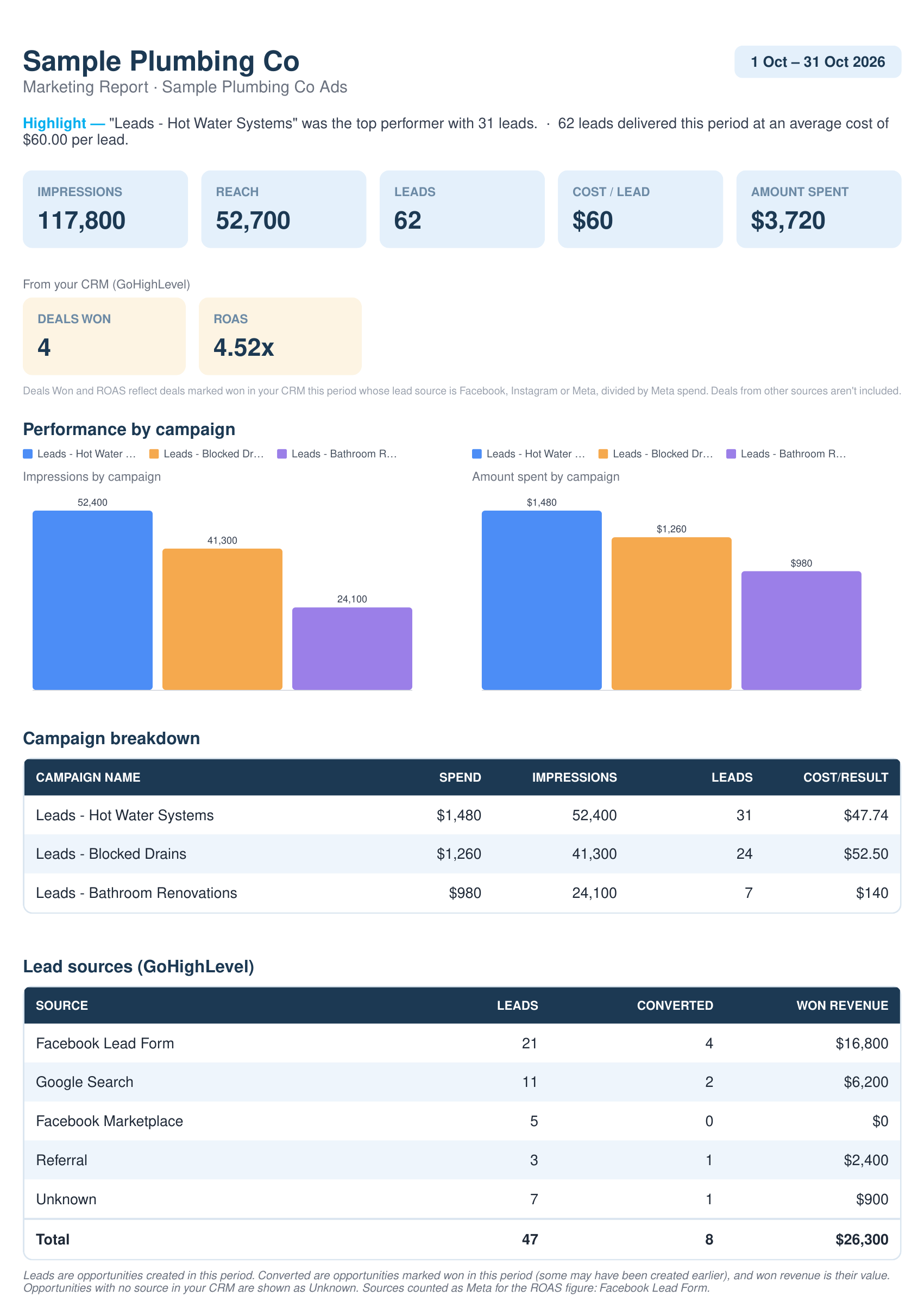
If you save your own logo and business name in Settings, client PDFs and report emails use them. With nothing saved, they carry Marketing Monster's name instead.
What GoHighLevel-based ROAS leaves out
This is the honest part. ROAS from a CRM is useful, and it is also narrower than people assume. Read it with these limits in mind:
- Only sources that identify Meta ads count. Organic and marketplace traffic does not, and deals with no source show as Unknown. The number is only as good as the sources your forms and team record.
- There is no GoHighLevel-based ROAS for Google Ads. A Google source still appears in the lead sources table, but ROAS is for Meta only.
- Timing is rough. Revenue counts in the period a deal was won. A long sales cycle means a lead's spend and its revenue can land in different periods.
- Your pipeline rules matter. A deal counts when it is marked won or sits in a stage you have named with the word Won. How your team marks deals decides what shows up.
- Big accounts may be incomplete. Very large accounts are summarized, and the report says so.
How to read the number: treat it as the revenue your CRM can trace to Meta sources, divided by Meta spend. It is not total revenue caused by your ads, and it is not a forecast.
Lead-flow check: catch a broken Meta-to-GoHighLevel hand-off
A lead form can keep running while the hand-off to GoHighLevel quietly breaks, so the ad account looks fine and the CRM stays empty. The lead-flow check compares the leads Meta reports with the new contacts GoHighLevel shows over recent days. It covers Meta only.
When Meta shows leads and GoHighLevel shows none, you get a "possible interruption", not a confirmed count of missing leads. You still check the workflow yourself.
Which setup fits: GoHighLevel alone, spreadsheets, or a reporting layer
| Setup | Fits when | The effort |
|---|---|---|
| GoHighLevel's own reports | One or a few clients, CRM-only numbers, internal or snapshot-style reporting | Build and schedule each report inside GoHighLevel, within its snapshot, 100-record and timezone limits |
| Spreadsheets or Looker Studio | You want full control of every metric and layout and will maintain it | You build and fix the data pull, formulas and layout yourself |
| A reporting layer beside GoHighLevel | Many clients, several channels, the same client report layout every month or on demand, ad spend next to CRM revenue | Connect each client once in Settings. Mind the ROAS limits above |
Marketing Monster is the third option. It sits beside GoHighLevel, not in place of it, and you can use any of the three for different clients.
See Marketing Monster for agencies for how the rest of the product fits together.
Plans
Starter is $59 a month for up to 5 clients, Growth is $149 for up to 15, and Agency is $299 for up to 40. All prices are in USD, every plan includes all channels, and there are no overage fees. See plans
Join the early access list. Early testers get in first.
Questions about GoHighLevel reporting
What is GoHighLevel reporting?
It is the dashboards and custom reports inside GoHighLevel (also called HighLevel or GHL). A custom report is a saved set of widgets you can run, export as a PDF or schedule by email. Its data is mostly what happens in your CRM.
Can GoHighLevel send reports to clients on its own?
Yes. You can schedule a custom report to email recipients who do not need a HighLevel login. The limits are listed above. Last verified November 10, 2026.
How do leads, cost per lead and ROAS from GoHighLevel get into a client report?
Leads and cost per lead come from your ad platforms. GoHighLevel adds leads by source, converted deals and won revenue, and Meta-sourced won revenue divided by Meta spend gives ROAS. The steps above show each stage, and all of it appears in the client report PDF.
How is ROAS calculated from GoHighLevel data?
Won revenue from deals that came from Meta sources, divided by Meta spend for the same period. Example: $3,000 in Meta-sourced won deals and $1,000 of spend is 3.0x. Organic and marketplace traffic is left out, and so is Google Ads revenue. A footnote on the report explains the rule.
Does Marketing Monster change anything in GoHighLevel?
No. It only reads. It does not create, edit or delete contacts or opportunities, send messages, or change workflows. It also does not create, edit or pause ads. It reads your data, reports on it and flags problems, and the decisions stay with you.
Does it replace GoHighLevel's reports or my CRM?
No. GoHighLevel stays your CRM, and its own reports keep working as they do now. Marketing Monster is not a CRM and not a GoHighLevel replacement. It reads your GoHighLevel data to build client reports and lead-flow alerts, and puts it next to your ad, analytics and SEO numbers.
How accurate is attribution from a CRM?
It is only as accurate as what your CRM records. If your forms set a lead source and your team marks deals won with a value, the match is solid. Missing sources show as Unknown, and long sales cycles blur single periods. Use it to compare periods and spot trends, and keep in mind what it excludes.
Does it work with many clients and sub-accounts?
Yes. Each client has its own GoHighLevel connection in Settings, so you can run many clients under one account. The number of clients depends on the plan: up to 5 on Starter, 15 on Growth and 40 on Agency.
How often does the data update?
Lead-flow checks run daily. GoHighLevel figures in a report reflect your CRM at the moment the report is built. A deal marked won afterward appears in the next report.
How much does it cost?
Plans start at $59 a month and include all channels, with no overage fees.
Send clients one report, not three exports
Connect a client's GoHighLevel account, read-only, and see leads, cost per lead and ROAS beside Meta, Google Ads, GA4 and SEO.
Join the early access list. Early testers get in first.
Related guides
- ComparisonAgencyAnalytics Alternative: How Marketing Monster Compares for AgenciesComparing AgencyAnalytics and Marketing Monster for agency client reporting: pricing model, channels, branding, client access and who each suits best.Read more
- ComparisonDashThis Alternative: How Marketing Monster Compares for AgenciesComparing DashThis and Marketing Monster for agency client reporting: dashboards versus per-client reports, pricing at 5, 15 and 40 clients, and fit.Read more
- ComparisonDatabox Alternative: How Marketing Monster Compares for AgenciesComparing Databox and Marketing Monster for agency client reporting: pricing model, white label cost, channels, scheduling and who each one suits.Read more
- ComparisonLooker Studio Alternative: Free Dashboards Versus a Finished Client ReportComparing Looker Studio (now Data Studio) and Marketing Monster for agency client reporting: free tool versus finished report, connectors, who builds it.Read more
See it on your own client accounts
Tell us about your agency and we will contact you about early access to Marketing Monster.
Join the early access list. Early testers get in first.